

Real-time tracking
Once you are receiving a stream of TrackingStateSet objects (see Data Access Methods),
you can access the UserState sub-structure which contains the user’s tracking state.
EW_BET_TRACKING_STATE_SET_HANDLE tss_handle; // Assume a valid handle
const EW_BET_UserState *user_state = EW_BET_API_GetUserState(tss_handle);
if (user_state->timestamp_in_seconds != EW_BET_NULL_DATA_TIMESTAMP) {
   // Use the data
}
// Assume we hold a valid TrackingStateSet instance
std::unique_ptr<eyeware::beam_eye_tracker::TrackingStateSet> last_received_tracking_state_set;
const eyeware::beam_eye_tracker::UserState &user_state = last_received_tracking_state_set->user_state();
if (user_state.timestamp_in_seconds != eyeware::beam_eye_tracker::NULL_DATA_TIMESTAMP) {
   // Use the data
}
from eyeware import beam_eye_tracker
tracking_state_set: beam_eye_tracker.TrackingStateSet  # assume a valid instance
user_state = tracking_state_set.user_state()
if user_state.timestamp_in_seconds != eyeware.beam_eye_tracker.NULL_DATA_TIMESTAMP:
   # Use the data
const trackingStateSet = api.getLastTrackingStateSet(); // assume a valid API instance
const userState = trackingStateSet.user_state;
if (userState?.valid) {
  // Use the data
}
The UserState State Structure
The UserState contains:
Each of these elements hold their own TrackingConfidence field, explained in the next section.
Tracking Confidence
The TrackingConfidence is a reliability measure for its respective tracking data package.
It is not a direct indicator of how accurate the tracking is, but it does indicate whether you should
discard some data. For example, it would be incorrect to assume that if the point_of_regard (see Unified Screen Gaze)
have a HIGH confidence, then it means that the eye tracking result is highly accurate. Instead
it only means that the conditions for the relevant tracking algorithms were deemed to be good
based on some internal heuristics (like measured illumination, eye-tracking on a screen that was
calibrated, head pose orientation or distance, etc.).
For an explaination of the values it can take, see EW_BET_TrackingConfidence.
Head Pose
The head pose is provided as a rigid transform such that a 3D point in the head coordinate system \(p_{hcs}\) is transformed to the World Coordinate System (WCS) by:
where \(p_{hcs}\) is a column vector defining the x,y,z coordinates in the head coordinate system, \(R\) (referred to as rotation_from_hcs_to_wcs in the C API) is a 3x3 rotation matrix and \(t\) (referred to as translation_from_hcs_to_wcs in the C API)
is a 3x1 vector translation, with units in meters.
The head coordinate system (HCS) is defined as follows:
The origin is at the nose tip.
The x-axis points from the nose to the left ear.
The y-axis points from the nose to the top of the head.
The z-axis points from the nose towards the front.
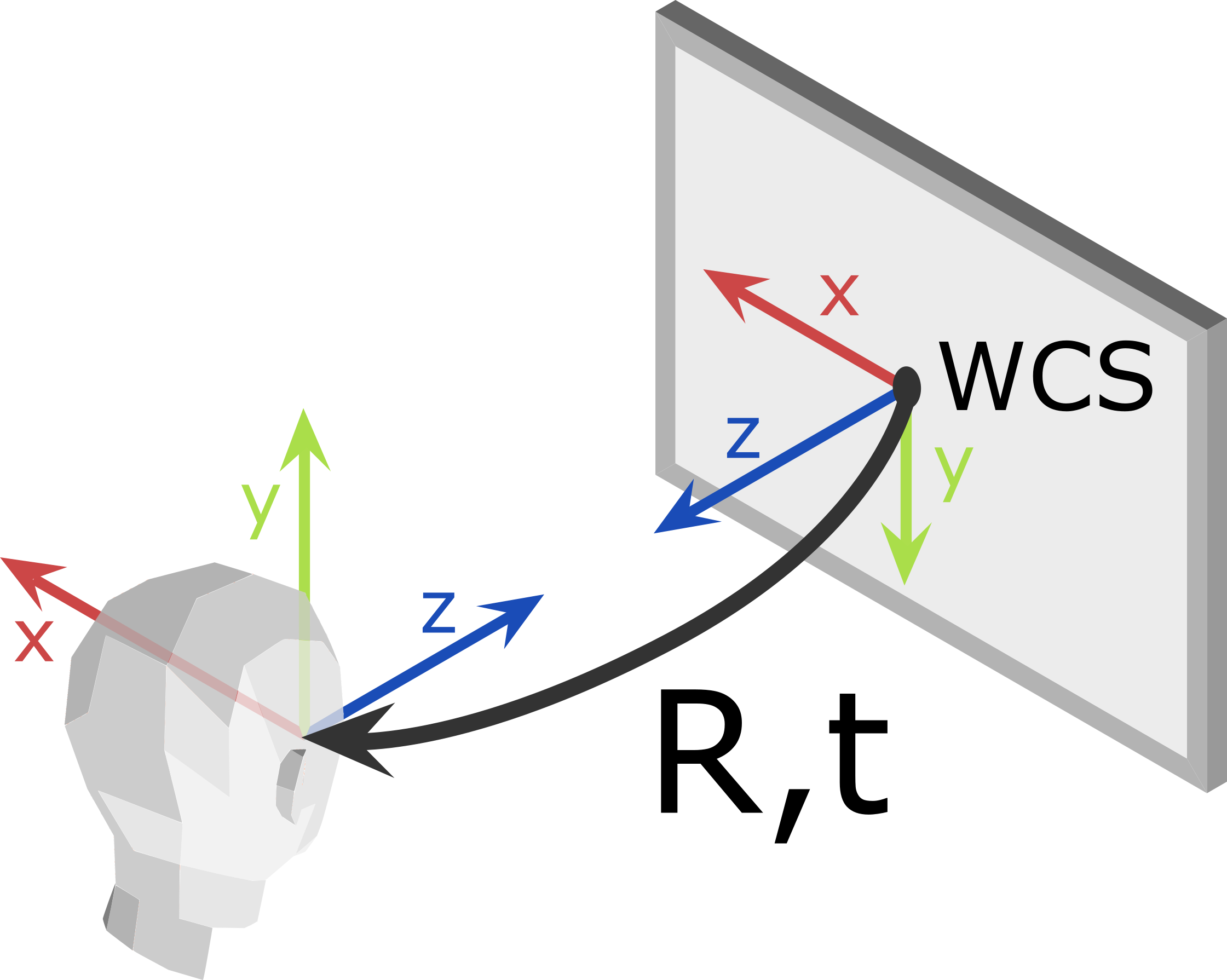
Here is a lateral view that shows the \({R, t}\) transform, as well as the xyz axes of the WCS and of the head frame
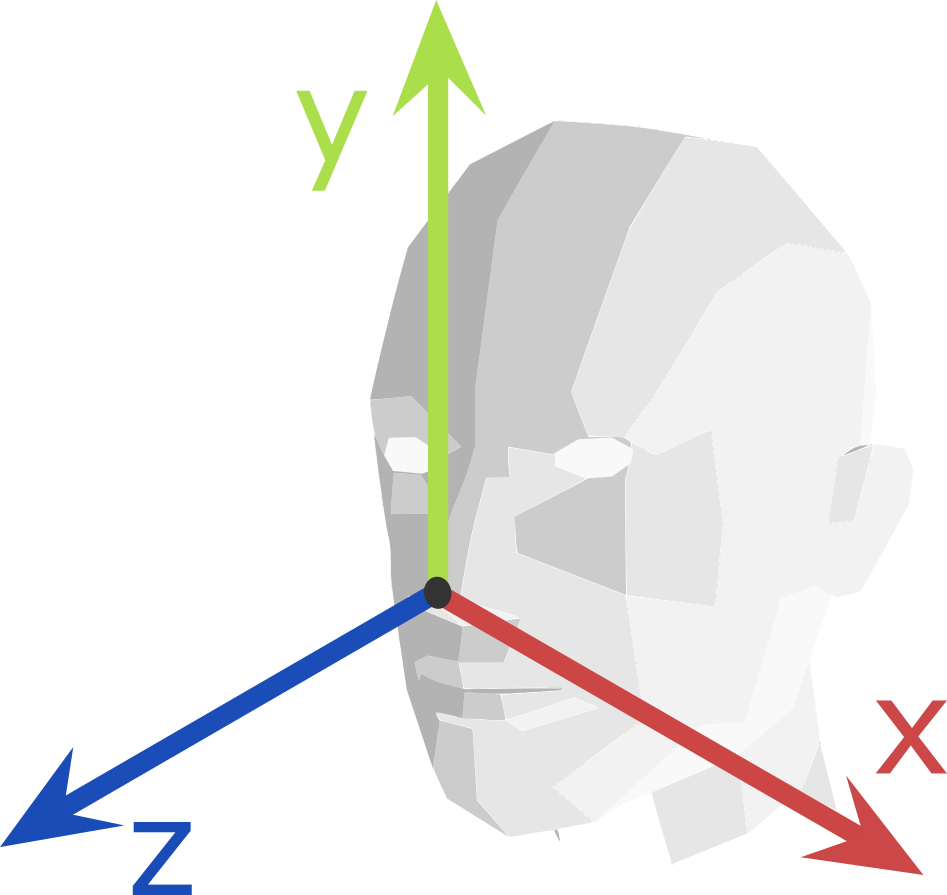
Frontal view showing the head axes from the point of view of the person
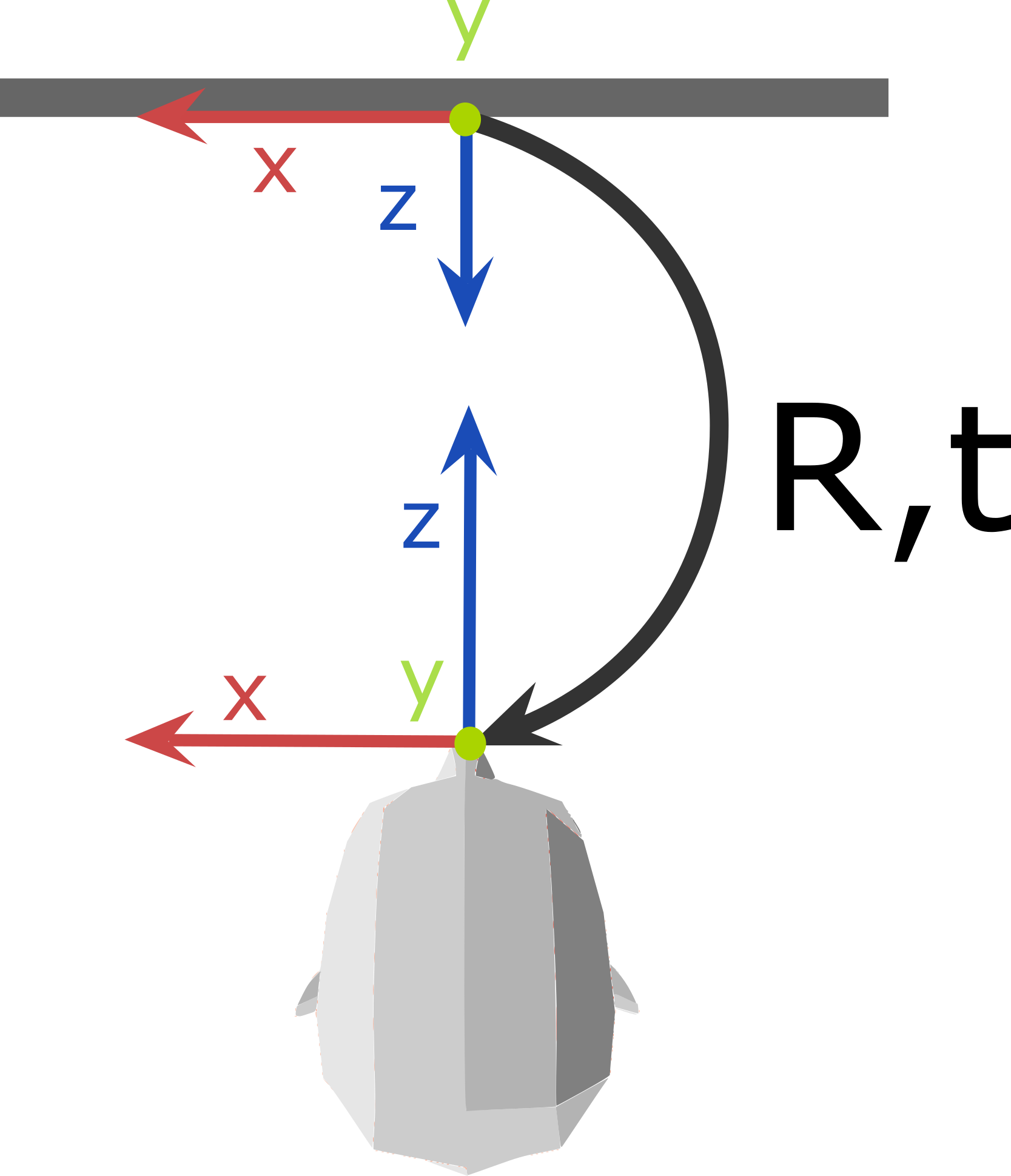
Top view showing the transform, the WCS frame at the screen center and the head frame on the nose tip
The head pose also contains a track_session_uid field, which is kept unchanged as long as the
person is being tracked without interruption. However, if the person goes out of frame or turns around
such that they can no longer be tracked for a moment, then this number is incremented once the
person is detected again.
Unified Screen Gaze
UserState.unified_screen_gaze describes where the user is looking on the logical desktop,
expressed in the Unified Screen Coordinate System.
point_of_regardis constrained to screen areas.unbounded_point_of_regardcan extend beyond the desktop, for example to animate an overlay beyond its edges.confidencedescribes the tracking conditions; it does not measure gaze accuracy. See Tracking Confidence. Ignore both points when it isLOST_TRACKING.
Gaze can move between screens, but transitions may still pause at an edge or jump. Physical gaps assumed between screens can cause an edge pause, while differences in screen size or DPI can cause a position change when moving between their coordinate mappings. Use Screen of Attention Gaze when you need Beam’s estimate of which screen is being looked at.
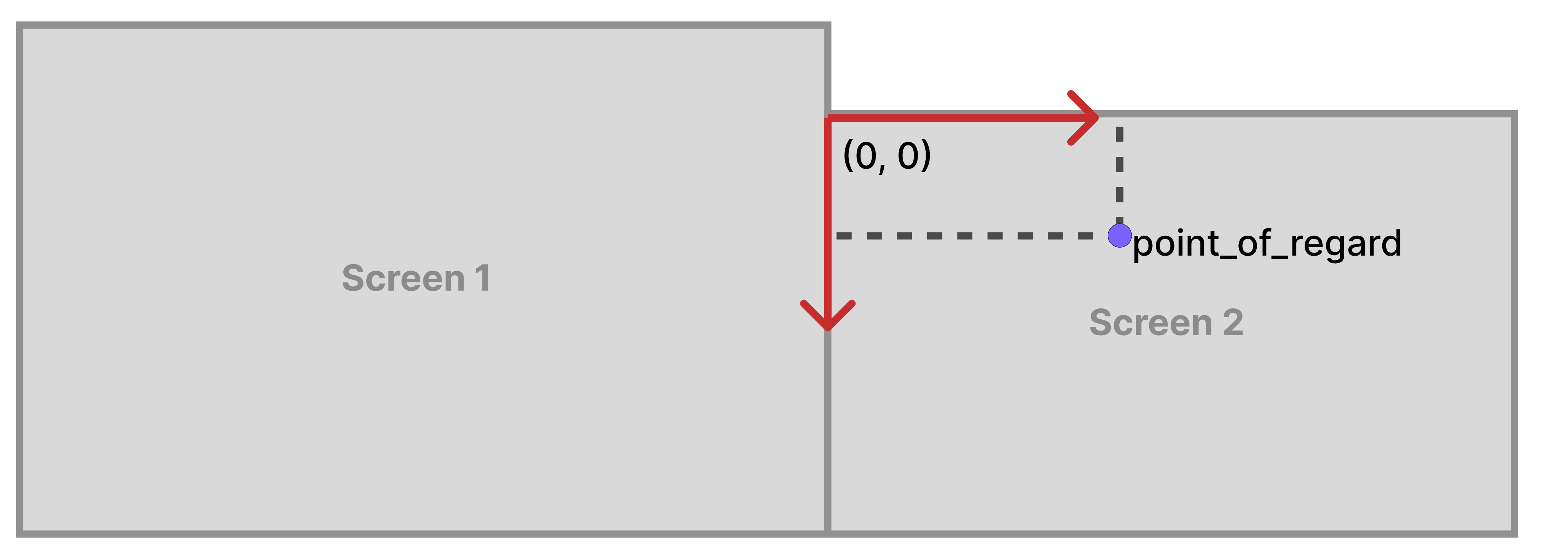
Gaze positions share one desktop coordinate system.
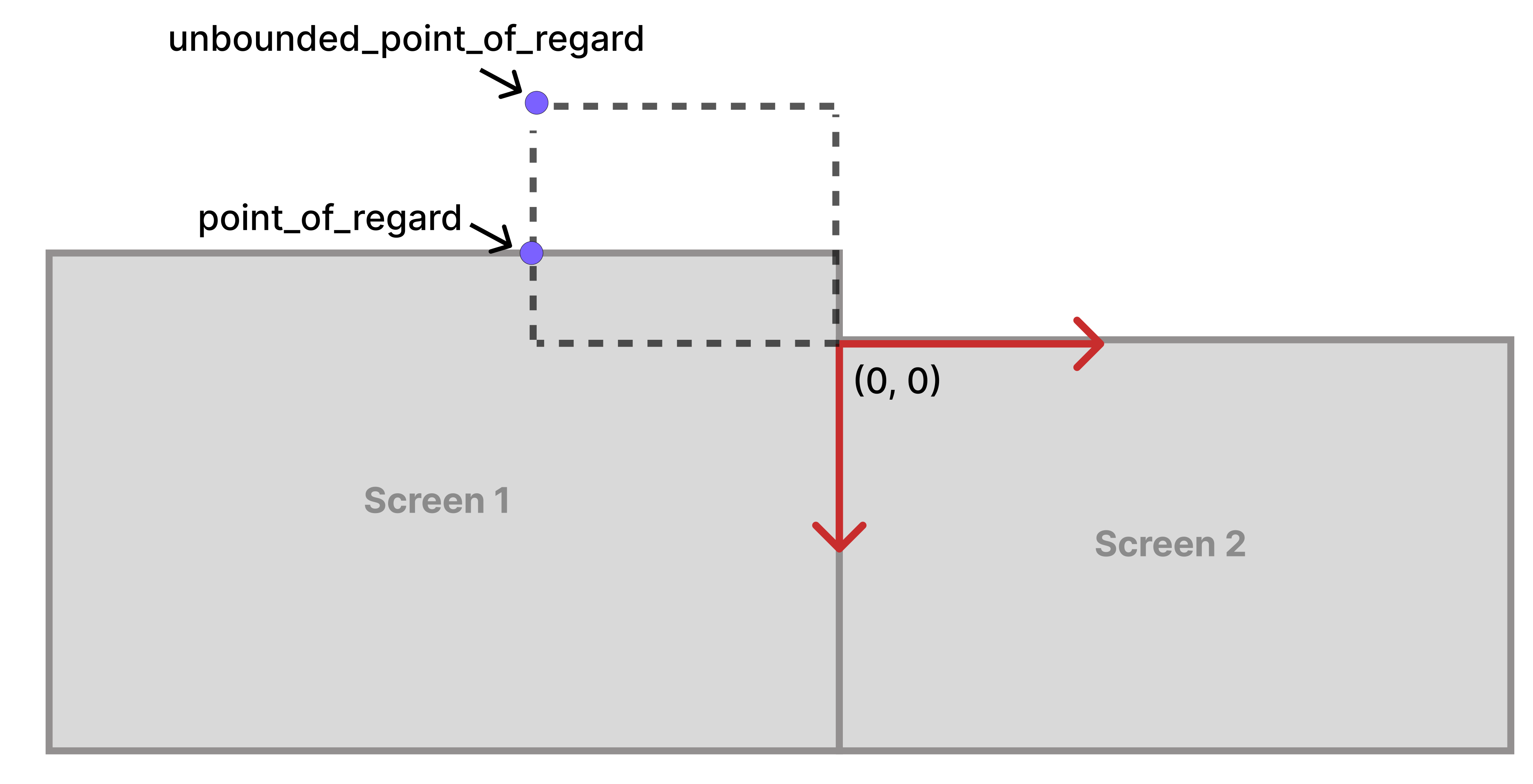
The unbounded point can extend beyond screen boundaries.
Note
Beam Eye Tracker 2.6.12 provides more continuous gaze across screen boundaries, accounting for differences in DPI and physical sizes. Existing SDK clients benefit without code changes. Older Beam versions keep bounded gaze clipped to the screen Beam estimates the user is looking at, and can also clip unbounded gaze during transitions. Updating the SDK alone does not change that behavior.
Screen of Attention Gaze
UserState.screen_of_attention_gaze describes Beam’s best estimate of which screen the user
is looking at:
screen_geometrygives that screen’s inclusivetop_leftandbottom_rightcorners.point_of_regardis the unclipped gaze position on that screen’s plane. When the user looks near the screen’s edges, the reported gaze position can extend beyond its logical boundaries. It retains that screen’s DPI even when it enters another screen’s logical area, keeping motion consistent relative to the screen of attention, for example for overlays.confidenceindicates reliability of the screen estimate, separately from unified gaze confidence. Ignore geometry and position when it isLOST_TRACKING.
Geometry and gaze use the Unified Screen Coordinate System.
Beam uses recent gaze history to keep its estimate of the screen being looked at stable. Near a screen boundary, it may continue reporting the same screen even as gaze enters another screen, until there is enough evidence that the user’s attention has shifted.
Note
Available in Beam SDK 2.3.0 with Beam Eye Tracker 2.6.12 or newer. With older supported
Beam versions, this field reports LOST_TRACKING.
Viewport Gaze
The ViewportGaze contains the eye gaze coordinates in relation to the Viewport,
referred to as normalized_point_of_regard.
The coordinates are normalized such that, if the gaze is inside the viewport, then the values are in the range \([0, 1]\).
The coordinates are not clipped, so they can be negative or exceed \(1.0\), if the gaze is outside the viewport.
Warning
If the viewport geometry is not updated into the API, then the ViewportGaze will be unreliable.